Did you know that there are two different certificates for tax benefits? These are:
1.Confirmation from the employer of the other taxpayer to claim the tax credit - see tax form MFin 5556 - model No. 1.
The form is intended for taxpayers (employers) for confirmation purposes in connection with proving entitlement to the tax benefit in circumstances where a child(ren) within a joint household is supported by more than one taxpayer. In accordance with Act No. 586/1992 Coll., on Income Taxes and according to the information provided by the taxpayer in the signed "Declaration of the taxpayer of the personal income tax from dependent activity", the taxpayer confirms the children for whom the taxpayer claims the tax benefit and the children of the taxpayer for whom the taxpayer does not claim the tax benefit (i.e. the children who can be considered as dependent according to the provisions of Section 35c(6) of the Income Tax Act both taxpayers).
2. Confirmation from the employer of the other taxpayer to claim the tax benefit for the purpose of filing personal income tax returns - see tax form MFin 5558 - model no. 2.
In this case, the form is intended for taxpayers (employers) for the purpose of confirming the tax benefit in connection with proving entitlement in the tax return in circumstances where a child(ren) within a single household is supported by more than one taxpayer. In accordance with the Income Tax Act, and in accordance with the signed 'Taxpayer's Declaration of Personal Income Tax on Employment' with the taxpayer, the taxpayer issuing this certificate shall list all children dependent on the taxpayer under the provisions of Section 35c(6) of the Income Tax Actliving with the taxpayer in a jointly managed household, i.e. also dependent children of the taxpayer for whom the taxpayer does not claim tax benefits from the taxpayer. For dependent children of the taxpayer for whom the taxpayer does not claim the tax credit, enter '0'.
AVENSIO Software:
Both confirmations can of course be found in payroll and HR software AVENSIO Software. Just select the menu Main menu - Printable reports - Confirmations and statements - 611211_Tax advantage for dependent child.
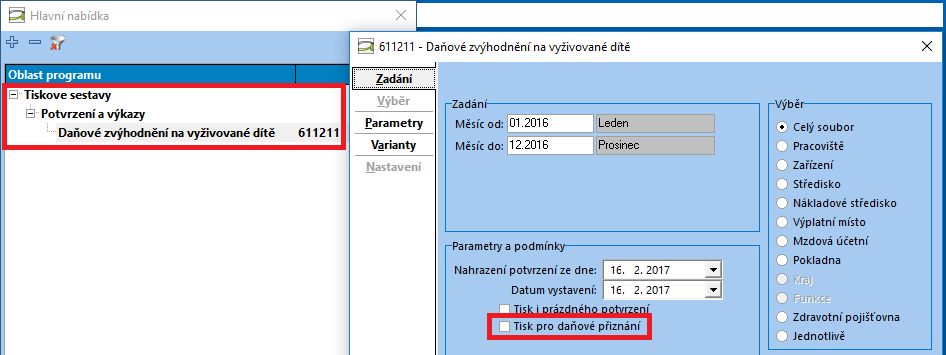
With an unrestrained condition "Printing for tax returns"To print the confirmation referred to in point 1 above, the above condition must be checked to print the confirmation referred to in point 2 above.
The confirmation shall be completed according to the data recorded in/on:
- Data Subject Directory - See the area on taxpayer identification.
- Employee card - tab Personal data / Employee a Personal data / Contacts - See the area on employee identification.
- Employee card - tab Personal data / Family members - See the area on dependent children.
- User account diary - see who made the certificate.
Important notice: Dependent children will only print to the receipt if they are saved with type "Child counted for tax purposes", "Child with a ZTP/P card 2x counted for tax benefits", "Child does not own counted for tax benefits" or "Child does not own with ZTP/P card 2x counted for tax benefit". In other words, a child saved with type "Child only registered" is not generated until confirmation.